CMMS Analytics and Reporting for Manufacturing Plants

MaintBoard helps maintenance and plant leaders review where downtime is concentrated, which jobs are overdue, and which machines keep failing. Use the recorded work orders and equipment history to decide what the team should tackle next.
  • Review downtime and repeat failures by machine.
  • See which preventive jobs were completed by their due dates.
  • Check whether jobs are waiting for parts or another action.
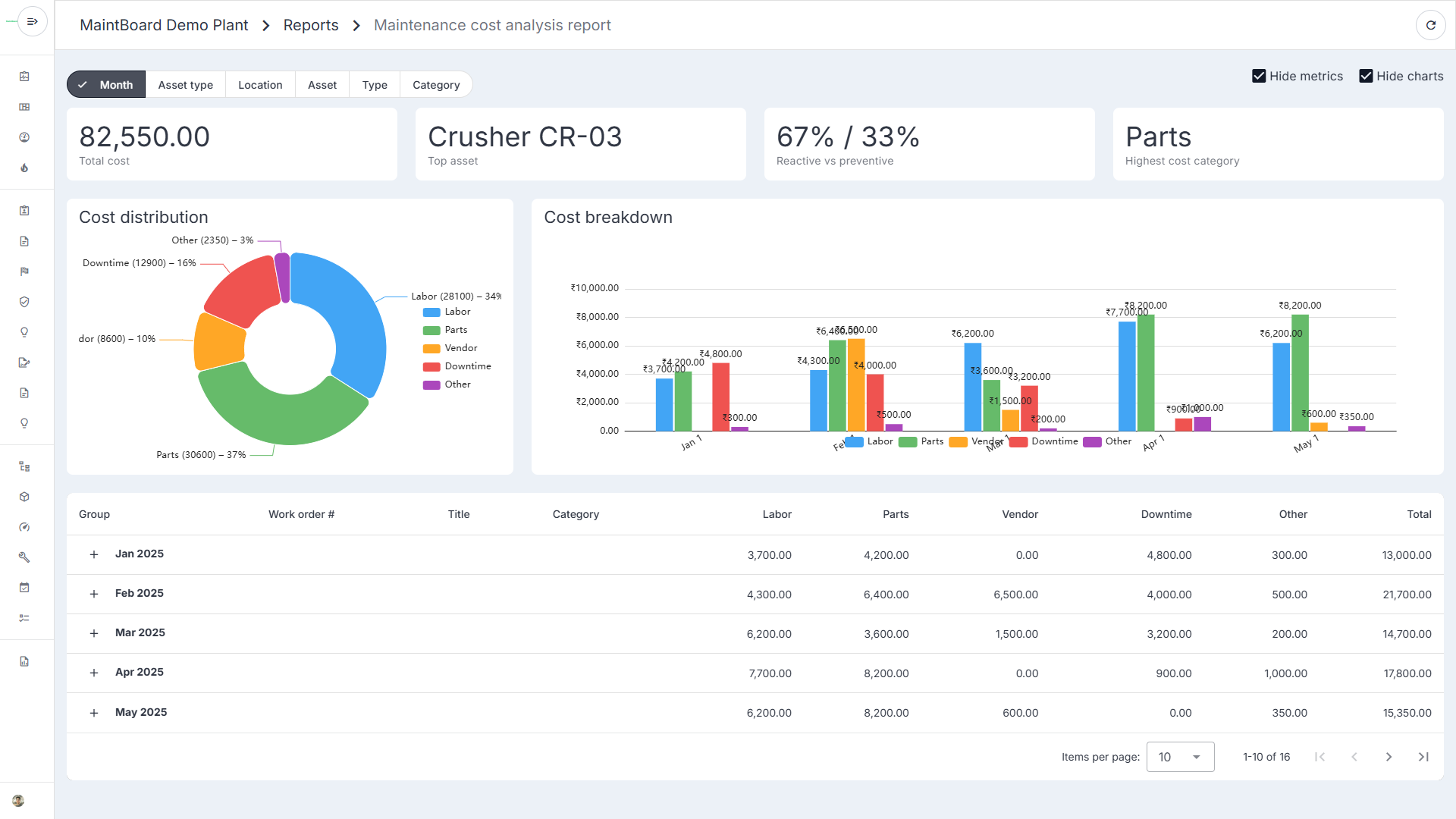
MaintBoard maintenance cost report showing monthly spending on labor, parts, vendors, downtime, and other costs.

Which stoppages should you investigate first?

One conveyor stops frequently for short periods. A transfer pump stops less often but costs more production time each time it fails. The maintenance review needs both frequency and duration.

Breakdown counts miss duration

A conveyor with many short stops may cost less production time than a pump with fewer, longer failures.

Downtime totals miss frequency

The total lost time alone gives little detail about whether one failure or several repeat stops caused it.

Repair history is needed for follow-up

Without the repair notes, the team has little context for deciding what to investigate next.

Run a weekly maintenance review

Start with one production area and a consistent reporting period so the team can compare like with like.

Step 1

Review breakdowns by machine

Look at both repeat failures and recorded downtime to decide which assets need a closer look.

Step 2

Open the maintenance history

Compare the faults and completed repairs. Check whether any corrective work is still open.

Step 3

Agree on the next action

Assign an investigation, confirm an overdue PM window, or review a spare holding up an open job. Explore work order tracking .

What you can review in MaintBoard reports

Work orders and backlog

Review open, in-progress, on-hold, and overdue work.

Equipment and breakdown history

Compare failure records, repairs, and downtime. Explore breakdown maintenance .

Spare parts usage

Review which jobs used parts and check whether usage is concentrated on particular machines.

Use the reports in your regular plant reviews

Daily handover

Check critical jobs and what's holding up repairs.

Weekly maintenance meeting

Review repeat failures and overdue PMs before scheduling next week's work.

Monthly reliability review

Compare equipment trends and agree which recurring failures to investigate.

Maintenance metrics worth tracking

Review jobs completed by their due date against the jobs due in the period.

PM compliance

Use mean time to repair and mean time between failures with consistent repair, failure, and operating-time records.

MTTR and MTBF

Use recorded lost production time to prioritize the assets with the greatest impact.

Breakdown downtime

CMMS Analytics and Reporting for Manufacturing Plants FAQs

What does CMMS reporting show?
MaintBoard reports cover work order activity, repeat breakdowns, downtime, preventive maintenance completion, and spare parts usage. The detail depends on what teams record.
Can we review reports by site or equipment?
Yes. Use the filters available on the relevant report to focus the review on the plant or equipment in scope.
Why can downtime and repair time differ?
Downtime measures how long equipment was unavailable. Repair time depends on how your team measures the repair interval. Agree on consistent definitions before comparing periods or machines.

Bring your weekly maintenance report

We'll walk through how to review your backlog, overdue PMs, and repeat failures using the records your team captures in MaintBoard.