Spare Parts Inventory Management Software for Manufacturing Plants

MaintBoard helps maintenance and stores teams see which spares are available, where they are stocked, and which jobs used them. Check the part before the machine stops for planned work, and review low stock before the next repair.
  • Find the correct part and see its balance by storeroom.
  • Record stock received, issued, and used on maintenance jobs.
  • Review low stock against upcoming work and recent usage.
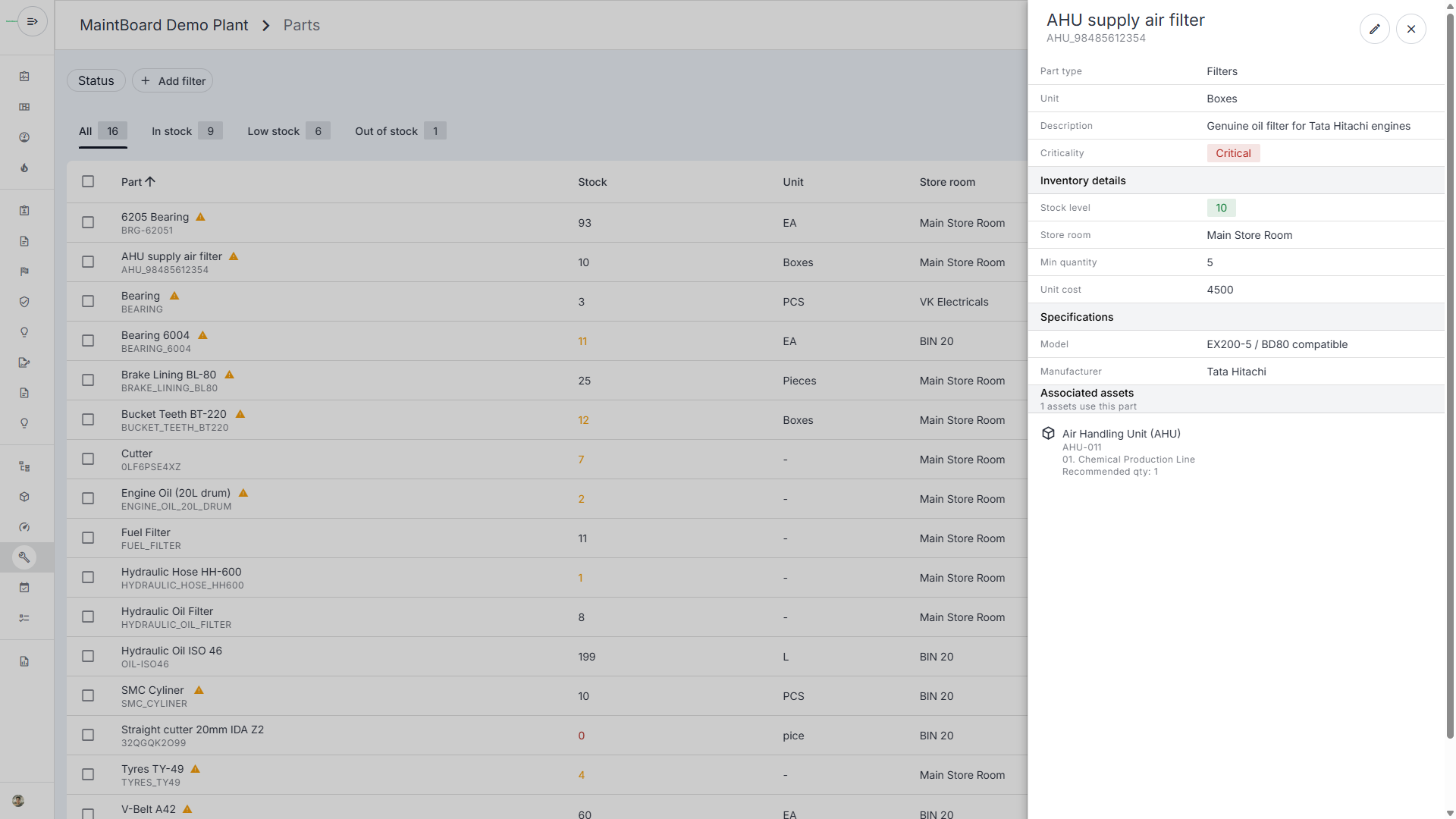
MaintBoard spare parts inventory showing a low-stock air filter, its minimum stock level and the linked air handling unit.

A seal kit is listed in stock. Is it the one that fits?

A pump overhaul is planned for Saturday. Two seal kits look alike, and the maintenance list gives only a description. Stores needs the right part code and enough stock in the right location.

Similar kits are easy to mix up

When the job lists only a description, stores can pick a seal kit that looks right but fits a different pump.

Stock may be in another storeroom

A plant-wide balance can show stock even when the storeroom serving the job is empty.

Unrecorded issues distort stock

If a kit is issued without updating the record, the next shift may rely on a balance that is too high.

Check the spare before the outage starts

Use the work order and the pump's history to prepare for the job with stores.

Step 1

Confirm the part code

Use the equipment record or previous work order to confirm the seal kit that fits.

Step 2

Check stock by storeroom

Review where the kit is held and compare the quantity against the job and other upcoming work.

Step 3

Record what went out

Record the issue and usage on the job, then review whether the remaining balance needs replenishment.

What MaintBoard spare parts management covers

Parts catalog

Maintain part codes and descriptions so teams can identify the right item.

Storeroom stock and movements

Review balances by storeroom and see what was received or issued.

Work order usage

Keep parts used with the job and equipment history. Explore maintenance work orders .

Where accurate stock matters

Packaging line

Check the sensor part number and available quantity before a changeover repair.

Process pumps

Identify the seal kit used on the last overhaul.

Critical drives

Review bearing and belt availability before the line is released for planned work.

What stores and maintenance should review together

Check flagged stock against planned and open jobs.

Minimum qty

See which machines repeatedly use the same part and review the repair history.

Repeat consumption

Compare movement records with a physical count when the balance looks wrong.

Stock discrepancies

Spare Parts Inventory Management FAQs

Can we track the same spare in more than one storeroom?
Yes. Review balances by storeroom so technicians know where to look for the part.
Can we set reorder levels?
Yes. Set stock levels and review items that need replenishment. Use the job schedule and recent usage to decide what to order.
Can we see which jobs used a part?
Yes. Record the parts used on the work order and review the usage alongside equipment history.

Bring a spare that has held up a repair

We'll show how to identify the matching part, check its storeroom balance, and record its use on a MaintBoard work order.