MaintBoard Enterprise Integrations
Enterprise Integrations
Keep your ERP. Give maintenance a better way to work.
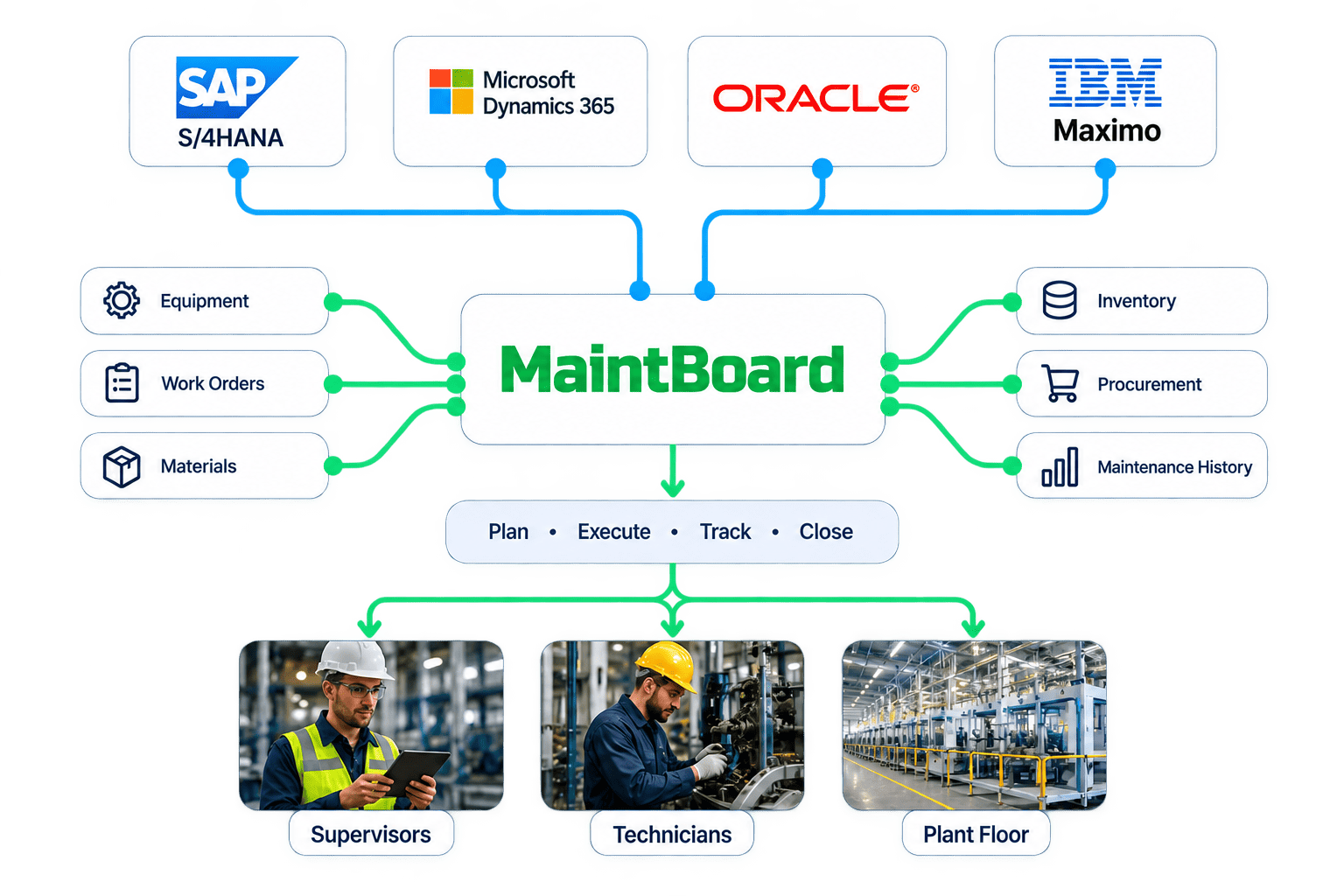
MaintBoard is designed to work alongside SAP S/4HANA, Microsoft Dynamics 365, Oracle, IBM Maximo, and other enterprise systems—so maintenance teams can execute work efficiently while the information your business depends on stays connected.
Why Integrate MaintBoard With Your ERP?
Because maintenance teams should not have to choose between enterprise control and a practical system for getting work done. Your ERP or EAM can remain the system of record while MaintBoard gives supervisors and technicians a focused environment for day-to-day maintenance execution.
Connect the Work That Matters
- Keep assets, locations, work orders, spare parts, and inventory aligned
- Reduce duplicate entry between maintenance and enterprise systems
- Give technicians a simpler way to execute maintenance
- Keep enterprise processes such as inventory and procurement connected
Problems
Your ERP Has the Data. Your Maintenance Team Still Has Work to Do.
Maintenance Still Happens in Excel
- The ERP may contain the official record, while daily planning, pending breakdowns, PM follow-ups, and technician updates still happen somewhere else.
Technicians Avoid Complex Enterprise Screens
- A system built for enterprise processes is not always the fastest place for a technician to report a breakdown, complete a checklist, add a photo, or close a job.
The Same Information Gets Entered Twice
- Work completed in the plant often needs to be entered again into another system, creating delays and unnecessary administrative work.
Spare-Part Information Is Disconnected
- A technician may know which part is required but still need to call the store or open another system to understand stock availability.
Maintenance and Purchasing Lose Context
- A critical spare requirement can quickly turn into emails, phone calls, or manual purchase requests without a clear link back to the equipment and maintenance work.
Management Sees the Picture Too Late
- When maintenance execution happens outside the enterprise system, breakdowns, parts consumption, completion status, and downtime may only become visible after manual updates.
Enterprise Systems
Fit MaintBoard Into the Systems You Already Use
You do not need to replace the enterprise platforms your business already depends on. MaintBoard can become the maintenance execution layer that works alongside them.
SAP S/4HANA
Connect maintenance execution with SAP plants, equipment, functional locations, materials, maintenance orders, operations, stock, spare-part consumption, and procurement workflows.
Microsoft Dynamics 365
Connect MaintBoard maintenance workflows with relevant Dynamics 365 assets, inventory, products, purchasing, and enterprise processes.
Oracle
Connect maintenance execution with Oracle asset, inventory, purchasing, and enterprise workflows while keeping the systems your organization already relies on.
IBM Maximo
Use MaintBoard alongside IBM Maximo where plants need a focused maintenance execution experience while selected asset, work, and maintenance information remains connected.
Connected Maintenance
Connect the Workflow, Not Just the Data
A useful integration should remove work from your team. It starts with understanding what happens in the plant, which system owns the information, and what needs to move between them.
Step 1
Keep Your Existing System of Record
- Your ERP or EAM can continue owning the enterprise master data and business transactions it already manages.
Step 2
Give Maintenance a Focused Workspace
- Supervisors and technicians use MaintBoard for breakdowns, PMs, work orders, inspections, permits, meter readings, parts, and maintenance history.
Step 3
Match the Records
- Enterprise identifiers such as equipment numbers, functional locations, materials, work orders, and operations can be mapped to the corresponding MaintBoard records.
Step 4
Move Only What Is Needed
- Instead of copying everything between systems, exchange the information required for the maintenance and business workflow.
Step 5
Trigger the Right Transaction
- Work creation, completion, parts consumption, stock requirements, approvals, or other events can drive the agreed integration workflow.
Step 6
Keep Enterprise Records Updated
- Relevant maintenance status, material usage, procurement requirements, and other agreed information can flow back into the enterprise process.
Integration Workflows
What Can Stay Connected?
Every organization is different. MaintBoard integrations are designed around the records and transactions that matter to your maintenance process.
Assets & Equipment
Keep equipment identifiers and asset information aligned without creating competing master records.
Plants & Locations
Connect sites, plants, production areas, functional locations, and equipment hierarchies.
Work Orders & Operations
Exchange maintenance orders, operations, priorities, planned dates, execution status, and completion information where required.
Spare Parts & Materials
Connect enterprise material masters with the spare parts maintenance teams plan and consume.
Stock Availability
Give maintenance teams better visibility into whether the parts required to complete the work are actually available.
Parts Consumption
Capture what was actually consumed during maintenance and pass the relevant transaction into the enterprise workflow.
Procurement
Connect maintenance requirements with purchase requisition or purchasing workflows when critical parts need replenishment.
Work Status & History
Keep relevant execution status and completed maintenance information available to the systems that need it.
Problems
Enterprise Control Without Slowing Down the Plant Floor
For Maintenance Teams
- Spend less time navigating enterprise systems and more time planning, executing, and documenting maintenance work.
For Operations
- Get clearer visibility into breakdowns, PM execution, equipment condition, and maintenance progress without chasing updates.
For IT & Management
- Keep system ownership clear, reduce disconnected tools, and preserve the enterprise controls your organization already depends on.
CMMS Integration FAQs
- If we already use SAP S/4HANA, why would we need MaintBoard?
- SAP can continue to manage your enterprise maintenance, inventory, procurement, and business processes. MaintBoard gives supervisors and technicians a focused environment for executing maintenance on the plant floor while the information that needs to remain in SAP stays connected.
- Can MaintBoard integrate with SAP S/4HANA?
- Yes. Integration can include areas such as plants, equipment, functional locations, materials, maintenance orders, operations, stock information, spare-part consumption, and procurement workflows. The exact scope depends on how your organization uses SAP.
- Can MaintBoard integrate with Microsoft Dynamics 365?
- MaintBoard can be integrated with Dynamics 365 where maintenance execution needs to remain connected with assets, inventory, products, purchasing, or other enterprise workflows.
- Can MaintBoard integrate with Oracle?
- Yes. The integration can be designed around the Oracle products and workflows your organization uses, including relevant asset, inventory, purchasing, maintenance, and enterprise information.
- Can MaintBoard work alongside IBM Maximo?
- Yes. MaintBoard can work alongside IBM Maximo where an organization wants selected plant-floor maintenance workflows in MaintBoard while Maximo remains part of the wider enterprise asset management architecture.
- Does MaintBoard replace our ERP or EAM?
- It does not need to. MaintBoard is designed to fit into your existing enterprise architecture and provide maintenance teams with a practical execution environment while your ERP or EAM continues handling the processes it already owns.
- Do we have to synchronize every record between the systems?
- No. In most cases, that would create unnecessary complexity. The integration should exchange only the records and transactions required by the business process, with a clearly defined system of record for each.
- How is the integration implemented?
- The integration approach depends on your enterprise system, available APIs, security requirements, system ownership, and the workflows that need to be connected. We define the integration around your existing architecture rather than forcing a fixed model.
Already Running SAP, Dynamics 365, Oracle or Maximo?
Show us how maintenance works in your plant today. We will help you identify where MaintBoard fits, what should stay in your enterprise system, and which workflows are worth connecting.