Utility Meter Tracking Software for Manufacturing Plants

MaintBoard helps plant teams record utility meter readings and review usage by meter and equipment. Track electricity and water consumption alongside steam totals and other utility readings. When usage changes, use the reading history to decide what to investigate.
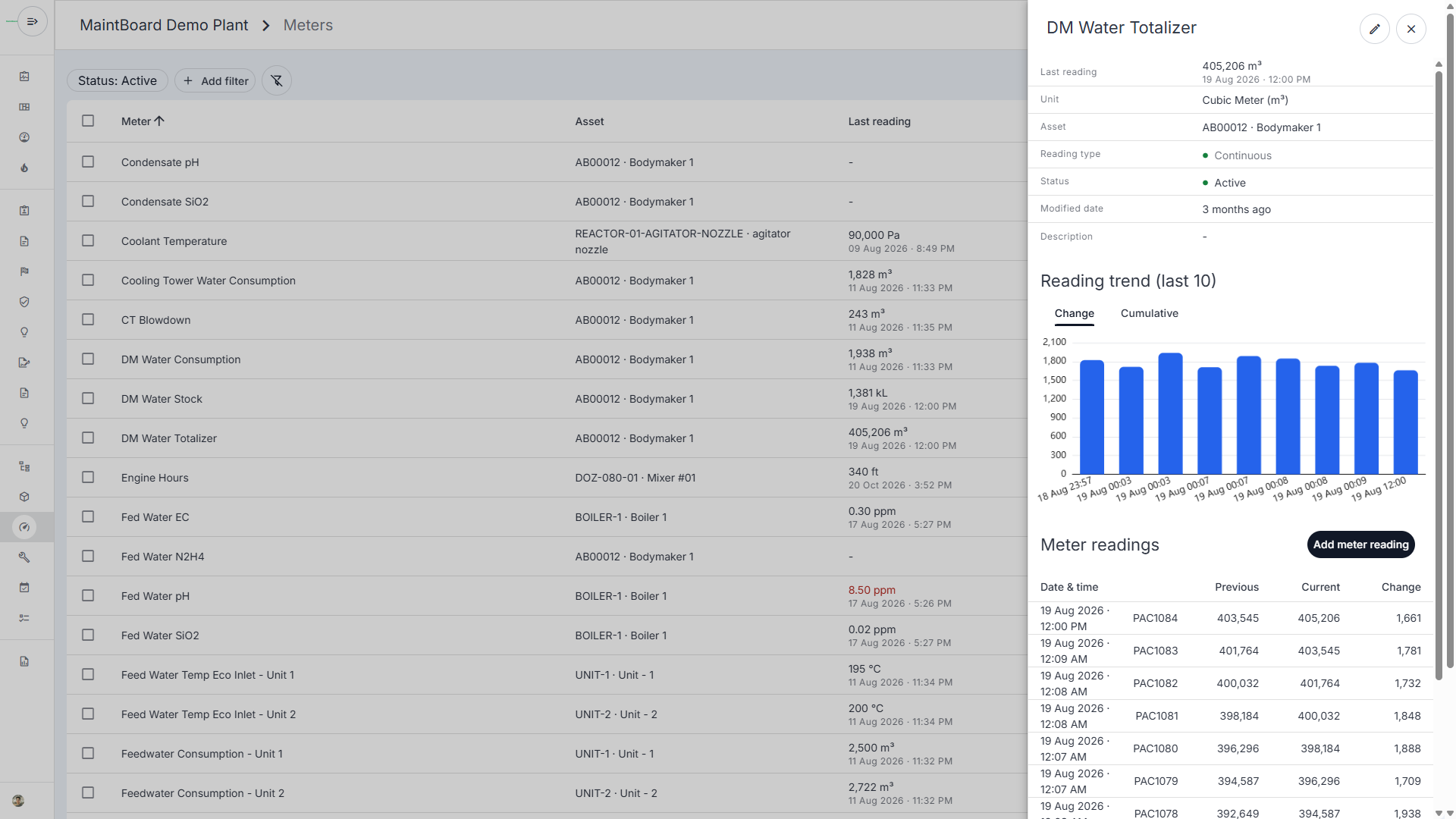
  • Keep readings and units with the meter and equipment.
  • See the cumulative total and the change between readings.
  • Assign a maintenance check when a reading warrants investigation.
MaintBoard water meter showing consumption between readings, with a bar chart and previous, current, and change values.

The meter shows a higher total. How much did the plant actually use?

A water totalizer keeps counting up. The plant team needs the difference between two readings to see how much water passed through the meter during that interval.

Cumulative totals can be mistaken for usage

The totalizer shows the running total. Usage for the interval comes from the difference between readings.

Uneven intervals distort comparisons

A change over eight hours is hard to compare directly with a change over a full day.

Unusual readings lack operating context

Before assigning an investigation, the team needs to check what was running and when the reading was taken.

How to track water usage from a totalizer

Take a demineralized water meter as an example. The meter records a running total in cubic meters.

Step 1

Set up the meter

Link the water totalizer to the relevant plant asset and choose cubic meters as the unit.

Step 2

Record each reading

Keep the date and time with the reading. Review the previous value, current value, and change in the meter history.

Step 3

Review the change in context

Compare readings over similar intervals and check what was running. If usage warrants investigation, assign an inspection and record the finding. Explore maintenance work orders .

What plant teams can track in one place

Cumulative readings

Record running totals for meters such as electricity in kWh or water in cubic meters, and review the change between readings.

Gauge readings

Track individual values such as compressed-air pressure, with configured limits where applicable.

Reading history

Review dates, units, and trends by meter and linked equipment.

Examples from manufacturing utilities

Electricity

Track kWh totals at metered plant areas and compare changes across comparable periods.

Water

Review water consumption from a cooling tower or process-water totalizer.

Steam and compressed air

Track steam totals where metered and review pressure readings on the compressed-air system.

What to check before acting on a change

Compare periods of similar duration or account for the difference.

Reading interval

Check production schedules and which equipment was running.

Operating context

Review the unit, previous reading, and recorded value before assigning an investigation.

Meter record

Utility Meter Tracking FAQs

Can we track more than electricity?
Yes. Configure meters for water, steam, and other plant utilities using the appropriate units and reading types.
What is the difference between a cumulative total and a change?
The cumulative total is the value displayed by the totalizer. The change is the difference between successive readings and shows usage for that interval when the meter has advanced normally.
Can we enter meter readings manually or bring them in from another system?
Yes, teams can enter readings manually. For an existing meter or data system, share the source and the readings you need so we can confirm the integration scope. Discuss integration options .

Bring a utility meter your team already reads

We'll show how to record its readings, see the change between readings, and review the meter history in MaintBoard.